
Most workflows aren’t as simple as they look on a whiteboard. There are steps that depend on other steps. There are approvals to wait for. There are jobs that can run in parallel and jobs that can’t start until something else finishes. And when something fails halfway through, you want to pick up from where you left off - not start from scratch.
Azure Durable Functions is a framework built around exactly these kinds of workflows. What makes it interesting isn’t just that it can automate processes - it’s that it comes with a set of defined patterns, each one designed to solve a specific type of workflow problem. My team used it to build a multi-type document processing engine, and in doing so, we leant on four of those patterns heavily. Here’s what each one looks like in practice.
Checkpoints: Function Chaining
Think about playing a video game. When you complete a level, the game saves your progress. If you lose the next level, you retry from there - not from the very beginning. That checkpoint is the whole point.
Function chaining works the same way.
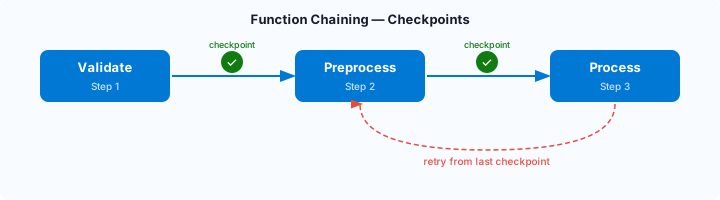
A workflow is broken into a sequence of stages, and after each stage completes successfully, progress is saved. In our case: validate the document, then preprocess it, then process it. If something fails during processing, we don’t re-run validation. We already know it passed. We pick up from the last checkpoint and carry on.
For any workflow with distinct, ordered steps - and where repeating completed work would be wasteful or risky - function chaining is the natural fit.
Doing Several Things at Once: Fan-out / Fan-in
Imagine you’re cooking dinner. You put the pasta on to boil and the sauce on to simmer at the same time. You’re not waiting for one to finish before starting the other. When both are ready, you combine them and serve.
Fan-out/fan-in is that same idea applied to automated workflows.
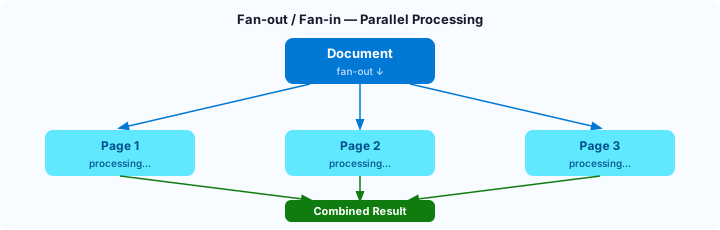
You split a job into parallel tasks (fan-out), let them run simultaneously, and then collect and combine the results when they’re all done (fan-in).
For us, this meant processing multiple pages of a document at the same time rather than one after another. The time savings are significant - and the pattern scales. The more pages, the more parallelism, the faster the result.
Waiting for Something to Change: The Monitor Pattern
Sometimes a workflow can’t continue until something else happens - somewhere else, outside of its control. The question is: how do you wait for that?
One way is to keep checking. Think of waiting for a letter to be delivered. You go to the letterbox every hour to see if it’s arrived. You’re not being told anything - you’re just polling. The monitor pattern works like this: the workflow regularly checks a condition (has the prerequisite appeared? has the status changed?) and only moves forward when it has.
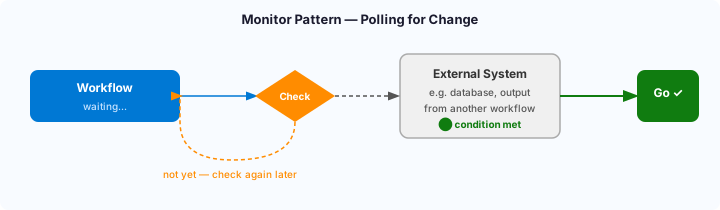
In our engine, the outputs of one document type fed into the processing of another. An XML document’s results were saved to a database, and the PDF orchestration would check periodically until those results were there. It’s a simple idea, but it keeps workflows loosely coupled and surprisingly resilient.
This is different from being notified - more on that next.
Waiting for a Human Decision: The Human Interaction Pattern
Not every decision in a workflow can be automated. Sometimes a person needs to step in. The human interaction pattern handles this scenario.
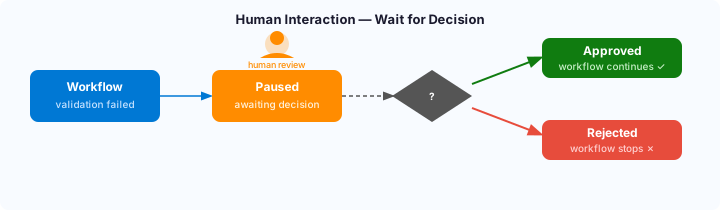
Consider an employee expense system: someone uploads a receipt and submits a refund request. A line manager then needs to approve or reject it. The workflow doesn’t keep checking every few minutes to see if a decision has been made. It simply waits - and the moment the manager approves or rejects, the workflow responds immediately. Approved: the process continues. Rejected: it stops.
This is the push model - the workflow is dormant until it receives a signal from the outside world.
In our document engine, this pattern handled cases where automatic validation wasn’t enough. When a document failed a validation check, rather than rejecting it outright, the workflow paused and waited for a human to review and decide. That human signal - approve or reject - determined what happened next.
One practical note: in real-world conditions, signals don’t always arrive cleanly. Transient errors can mean an event fails to be raised. To make our implementation more reliable, we combined the human interaction pattern with the monitor pattern - adding a periodic database check as a fallback, so the workflow could recover even if the event-based trigger missed.
Performance: It Scales, But It Isn’t Free
Once the patterns were in place, the next challenge was making the engine fast enough to be useful at scale. That involved tuning several knobs: how many activities could run concurrently, how many orchestrators could operate in parallel, what batch sizes worked best, and how the underlying infrastructure scaled horizontally when load increased.
The good news: throughput scaled roughly linearly. Triple the resources, triple the output. That’s not guaranteed in every system - there are often bottlenecks that prevent linear scaling - but in our case it held.
The less straightforward news: that scaling comes at a cost. More resources mean higher bills. There’s a ceiling defined not just by technical limits but by what makes financial sense. Performance tuning, in practice, is always a balance between speed and spend.
Would I Use It Again?
Without hesitation - for the right problem.
Azure Durable Functions shines when your workflow has real complexity: dependencies between steps, parallel work that needs to be coordinated, human decisions in the middle, or a need to wait on external systems. The patterns aren’t abstract engineering concepts - they’re solutions to problems that real workflows actually have. Recognising which pattern maps to your problem is most of the work.
What’s Next
The four patterns covered here - function chaining, fan-out/fan-in, monitoring, and human interaction - are what Microsoft documents as the durable application patterns . Together, they cover most of the workflow automation problems you’re likely to encounter.
But patterns are only part of the story. Under the hood, Azure Durable Functions comes with a set of core concepts that are worth understanding if you’re planning to build with it seriously: how task hubs store orchestration state, how error handling and retries work, how to manage versioning when your workflows evolve, and more.
Those are the subject of another post.